Help Center (FAQ)
Answers to the questions we hear most about registration, payment, e-tickets, promo codes, and Ballot events on ACTIV.
Registration & Account
Who can register for events on ACTIV?
Anyone! ACTIV is open to everyone: professional athletes, recreational sports enthusiasts, communities, and the general public who want to join sports events.
How do I register and buy event tickets on ACTIV?
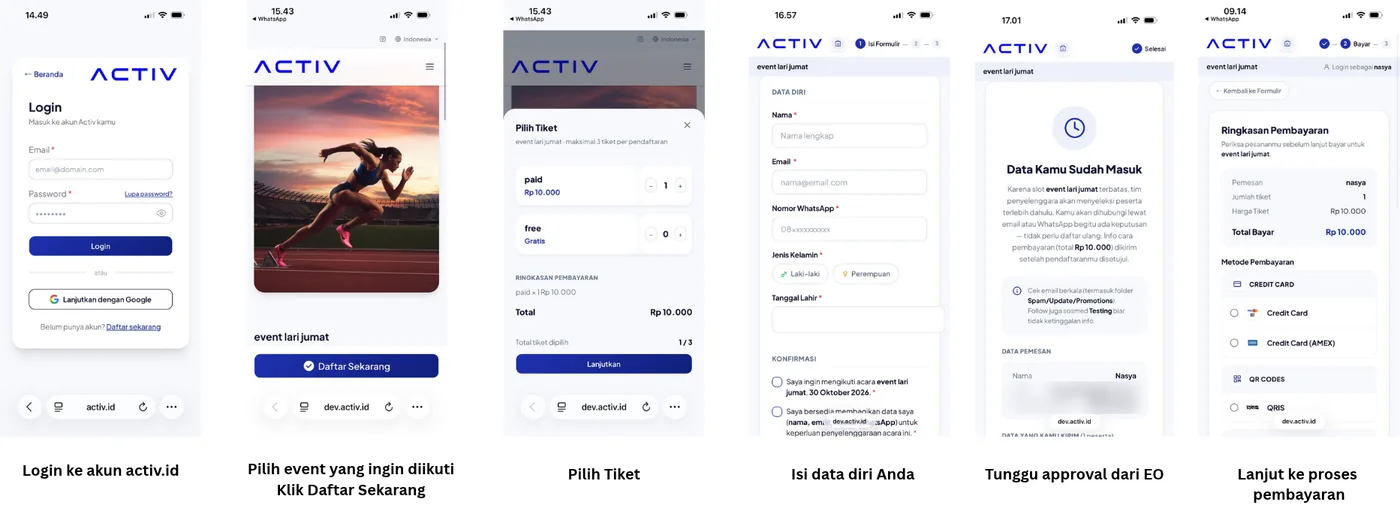
- Open activ.id and choose the event you want to join.
- Click the Register Now button.
- Choose the ticket category or bundle package you want, then fill in the registrant details.
- Choose a payment method and complete the transaction before the time limit runs out.
- Your e-ticket will automatically arrive in your email and in the My Tickets menu of your profile.
Do I have to create an account before registering?
You can register directly or use Login with Google for a faster process. We recommend creating an account so your ticket history and athlete profile are kept neatly in one place.
What if my profile photo does not appear or is broken?
If you registered or logged in with Google and your profile photo has not appeared, go to Profile / Edit Profile and upload the photo of your choice manually.
Payment & E-Ticket
Which payment methods are available on ACTIV?
ACTIV supports several instant payment methods through an official Payment Gateway, such as Virtual Account (bank transfer), E-Wallet (QRIS, ShopeePay, GoPay), and credit/debit cards.
I have paid but my transaction status is still "Pending". What should I do?
Automatic verification usually takes 1–5 minutes. If the status does not change, please contact the Customer Support (CS) team and attach your official proof of transfer so they can verify it manually.
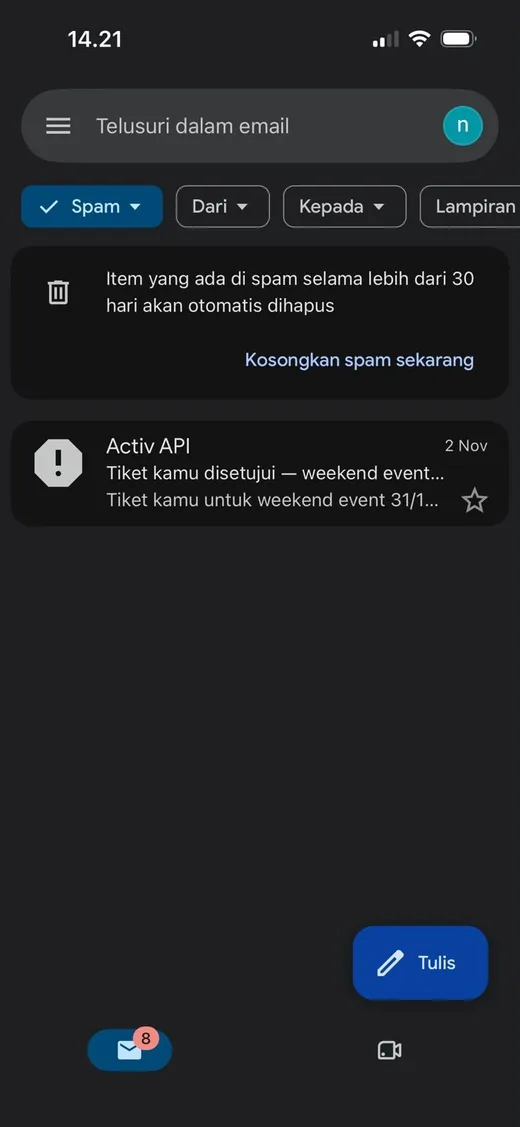
What if the registration email does not arrive in my inbox?
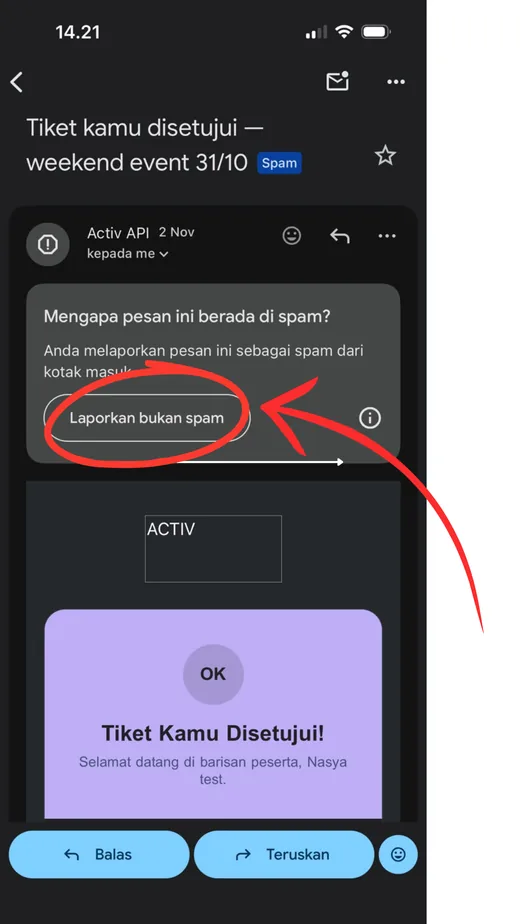
Check your Spam/Junk folder. If it is there, open the email and click "Not Spam" so it moves to your Inbox and the QR Code shows normally.
Why does the e-ticket QR Code / barcode image not appear when I open the email from the Spam folder?
The built-in security of email providers (Gmail/Yahoo/Outlook) automatically blocks images in spam messages. Click "Report Not Spam" so the email moves to your Inbox and the e-ticket image will appear automatically.
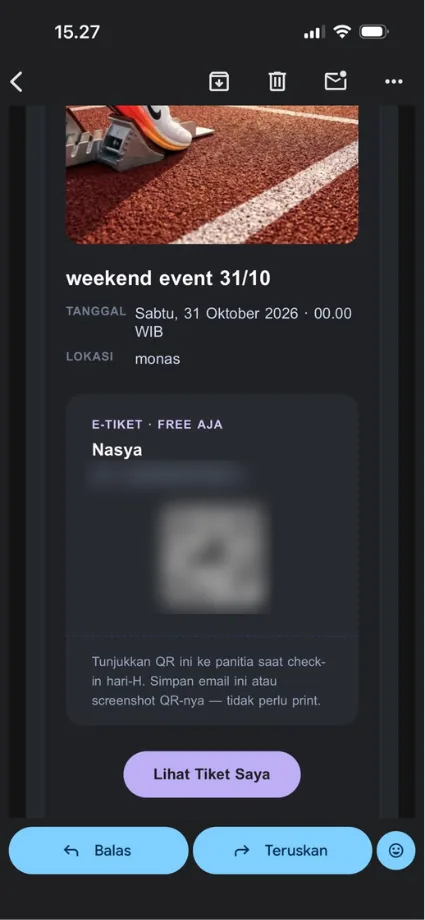
What if I cannot find the e-ticket email at all (neither in Inbox nor Spam)?
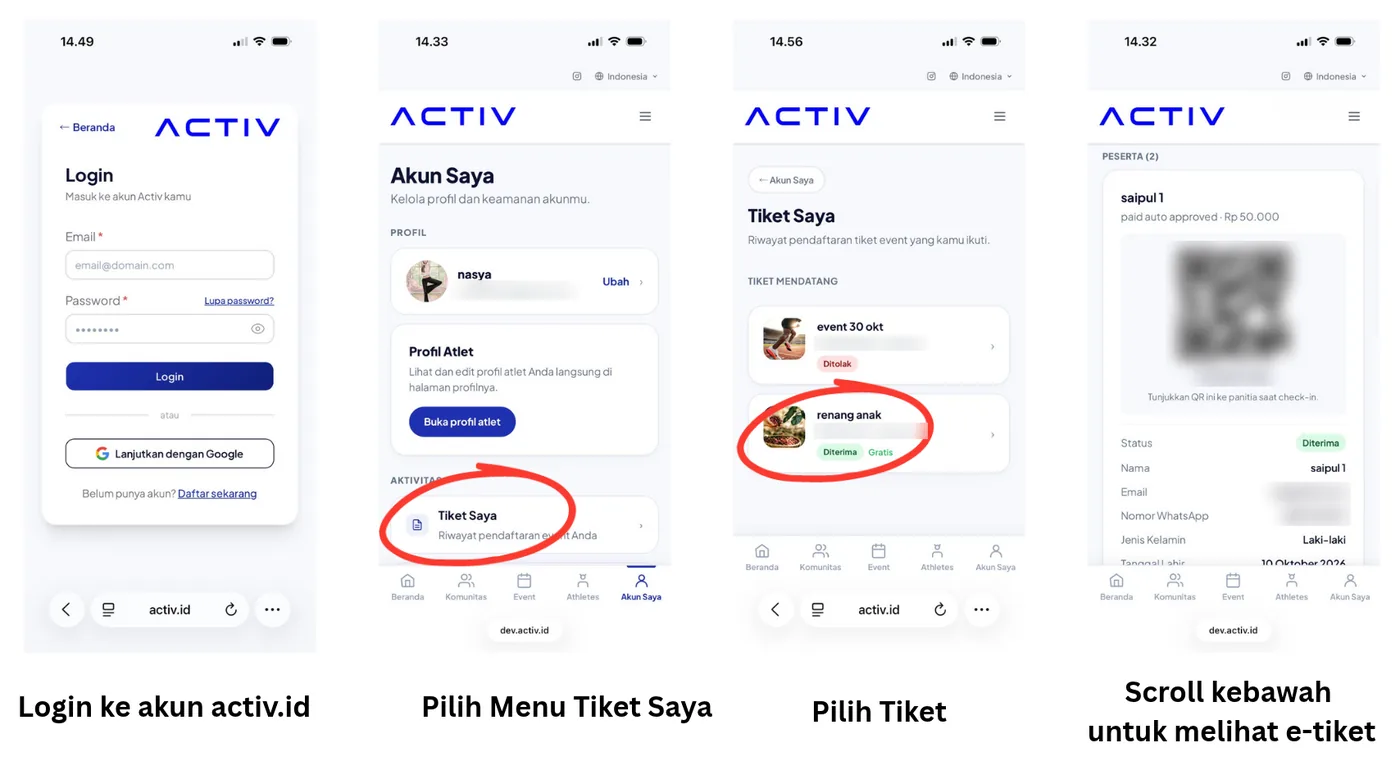
You can also see your e-ticket on the My Tickets page on activ.id. Log in to your activ.id account, then open the My Tickets menu. Your e-ticket and QR Code are already saved there and ready to use for check-in.
Promo Codes, Discounts & Bundles
How do I use a Promo Code or Referral Code?
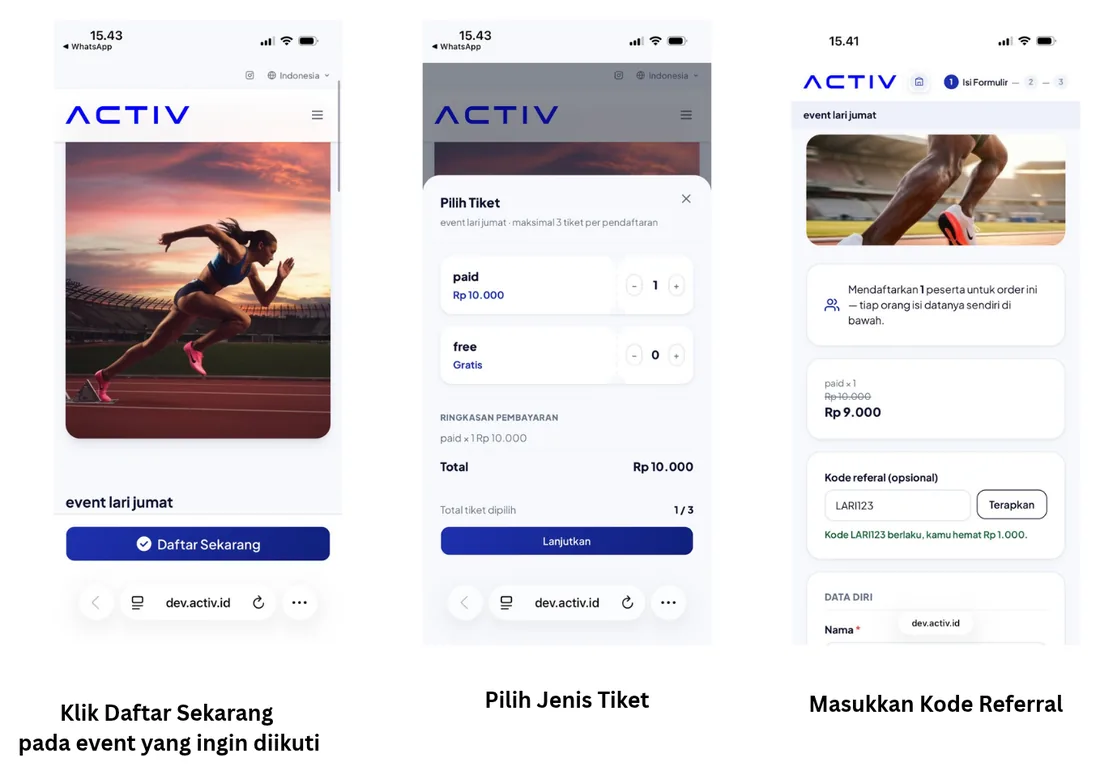
Enter the promo/referral code in the field on the event registration form before you pay, then click Apply. The discount is taken off your total payment right away.
Can I combine two promo codes in one transaction?
No. ACTIV allows only 1 promo code or 1 referral code per transaction.
What is a Ticket Bundle Package?
A Bundle Package is a special feature from the Event Organizer (EO) that lets you buy several tickets at once (for example a 2-Person Package or Community Package) at a special discounted price.
Event Day & Check-In
Do I need to print my e-ticket when I arrive at the venue?
No need! Just show the e-ticket QR Code from your phone screen, from your email or the My Tickets menu on the ACTIV website, at check-in.
Can a ticket I have bought be cancelled or refunded?
Tickets that have been successfully purchased are non-refundable, in line with the terms and conditions set by the Event Organizer (EO).
Ballot Events (Draw System)
What is the Ballot Event system on ACTIV?
A Ballot Event is a draw-based registration system for events with limited quotas or very high demand. It gives every registrant a fair chance at a ticket slot without having to compete in a ticket rush ("war ticket").
How is the Ballot ticket draw done?
After the Ballot registration period closes, the EO runs the draw automatically and randomly (a random system draw), transparently and according to the available quota. Winners are chosen purely by the system's random selection, with no manual intervention.
How do I join a Ballot Event?
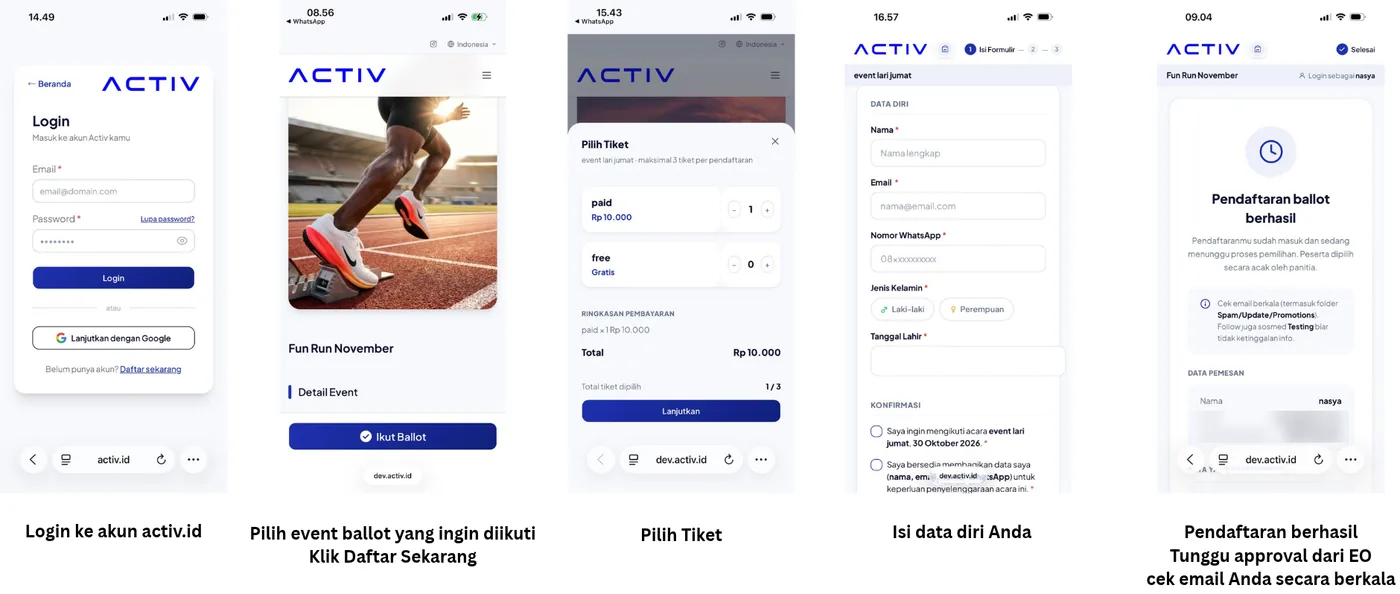
- Open the page of an event that uses the Ballot system on activ.id.
- Click the Register Ballot / Enter Ballot button and fill in the registrant details completely.
- Complete the ballot registration within the period set by the Event Organizer (EO).
- Wait for the draw result announcement date.
Does registering for the Ballot mean I will definitely get a ticket?
Not necessarily. Ballot registration only means your name/account is officially in the list of candidates who will take part in the draw (the draw pool).
When and how will I know the Ballot result?
The result is announced on the date set by the EO. You will receive an announcement notification by official ACTIV email, and you can also check your draw status directly in the Profile / My Tickets menu on the ACTIV website.
What should I do if my name is drawn as a winner?
For paid events, you must pay for your ticket within the payment window that has been set. For free events, the e-ticket is issued right away and sent to your email, and can also be accessed from the My Tickets menu in your ACTIV account.
What if I am not selected (I lose the draw)?
If you are not selected in the main draw, you will be placed on a waiting list. If a winner does not pay on time or cancels their ticket purchase, that slot will be drawn again among the people on the waiting list.
Can't find your answer? Contact the ACTIV Customer Support team and include your order code and proof of payment if you have one.